QoL for editing/deleting blueprints
I've accidentally deleted the wrong blueprint multiple times. This is due to 1) there not being a confirmation prompt 2) the behaviour of the edit/delete blueprint tooltip.
1) There should be a confirmation prompt (similar to demolishing a building) when deleting a blueprint, especially since deleting a blueprint seems to be irreversible and persistent between saves.
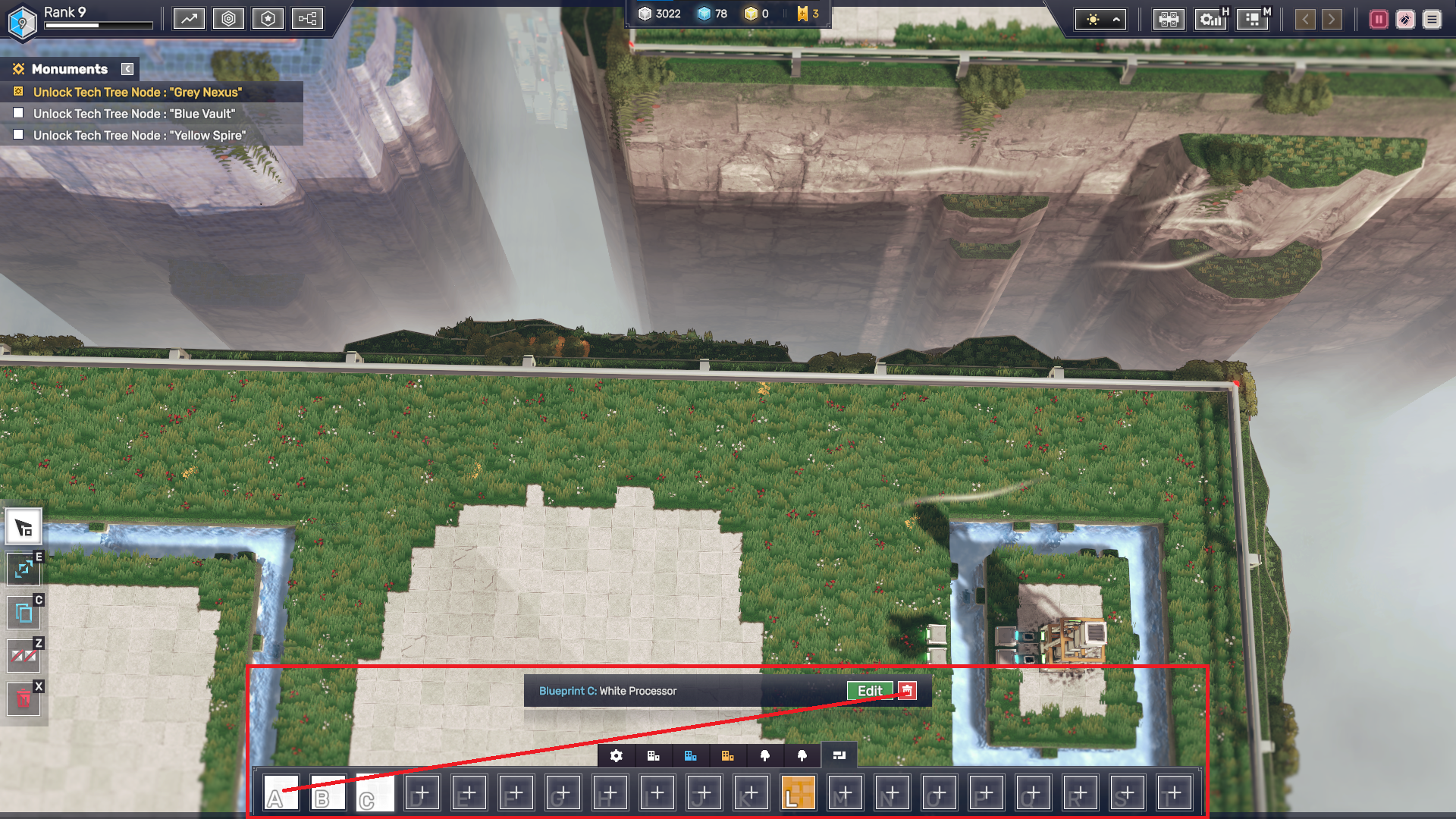
2) Currently, the edit/delete tooltip only appears after mousing over a blueprint. If a blueprint is clicked on, the tooltip disappears. If the mouse leaves the hotbar area, the tooltip disappears. This behaviour forced me to stay within the hotbar area as I moused over from a blueprint to the delete button. As a result, I accidentally moused over a different blueprint and deleted that one instead.
It would be more intuitive for the blueprint tooltip to behave similarly to the tooltip for other placeables, i.e. remain open when the blueprint is clicked on, remain open even if the mouse leaves the hotbar area, not be overridden if a different blueprint is moused over.
Attached is a screenshot that shows the rough area that the mouse has to stay within for the tooltip to remain open. It also shows the mouse path one may intuitively take to go from Blueprint A > Delete, showing how easy it is to accidentally mouse over a different blueprint before clicking delete.